CareOn Radar SOC

Attackers don't keep office hours. Neither do we. CareOn Radar SOC goes beyond checking that your security products are running: it is a security operations service that analyzes security events 24/7 and responds according to the response authorization matrix. AI gives analysts the information they need to decide; the analyst makes the call. Scope is finalized in your quote, based on your inventory.

AISecOpsAI in security7/24alert monitoring3source: Wazuh · Sentinel · Defender XDR30 minfirst-response target for critical incidents
Dealing with a cyber incident right now?

If you've spotted ransomware, a compromised account or suspicious access, call our critical incident line right away.

+90 850 399 37 24
AISecOps

AI prepares the information. The analyst decides.

  • Prioritizes alerts and groups related incidents into a single case
  • Matches indicators of compromise; customer data stays isolated
  • The analyst verifies and responds according to the authorization matrix
See the operations center →
Scope

Two services: MXDR and MSOC

MXDR · 6.10

Microsoft Defender XDR Security Operations

Covers 24/7 monitoring of security signals from endpoints, email, identities, cloud apps and cloud workloads, incident assessment, and response according to the authorization matrix.

Service boundaryFocuses on managing signals and incidents in the Defender XDR portal; for SOC operations run on Sentinel, choose the MSOC service.

Service details →
MSOC · 6.9

Microsoft SOC Monitoring and Alarm Management

Covers 24/7 monitoring, validation, prioritization and notification of security alerts generated by Microsoft Sentinel and Microsoft Defender XDR, plus incident response according to the authorization matrix.

ScopeOperating the Sentinel SIEM platform is a separate service (6.8).

Service details →
Security Operations Center · AISecOps

Incidents become cases. IOCs are matched across customers.

Behind CareOn Radar SOC is our security operations center, working 24/7. Signals from Wazuh, Microsoft Sentinel and Microsoft Defender XDR are assessed together with the related case and customer information; response follows the authorization matrix agreed with you at service start. Customer data stays isolated during indicator matching, and each analyst sees only the customers they are authorized for.

Event stream · all customers · 24/7
  • Suspicious sign-in
    Customer A
    INC-142
  • Connection to unknown domain
    Customer C
    INC-147
  • Encoded command line
    Customer A
    INC-142
  • Multiple failed sign-ins
    Customer D
  • Connection to unknown domain
    Customer A
    INC-142
  • Malicious attachment blocked
    Customer B
INC-142High

Suspicious sign-in and outbound connection

Customer A · 3 events correlated · analyst assigned
T1078T1071
IOC update-check.example
INC-147 · Customer C Connection to unknown domain update-check.example ↔ shared indicator: 2 customers

Response authorization matrix

  • Endpoint isolation✓ pre-approved
  • Session termination✓ pre-approved
  • Domain blocking✓ pre-approved
  • Server shutdown◷ customer approval
AISecOps · analyst workspace

From signal to case, one workspace.

The Radar SOC workspace brings security incidents, investigation findings and relevant customer information together on one screen. AI prepares the information needed; analysts see the priorities and run their investigations with it.
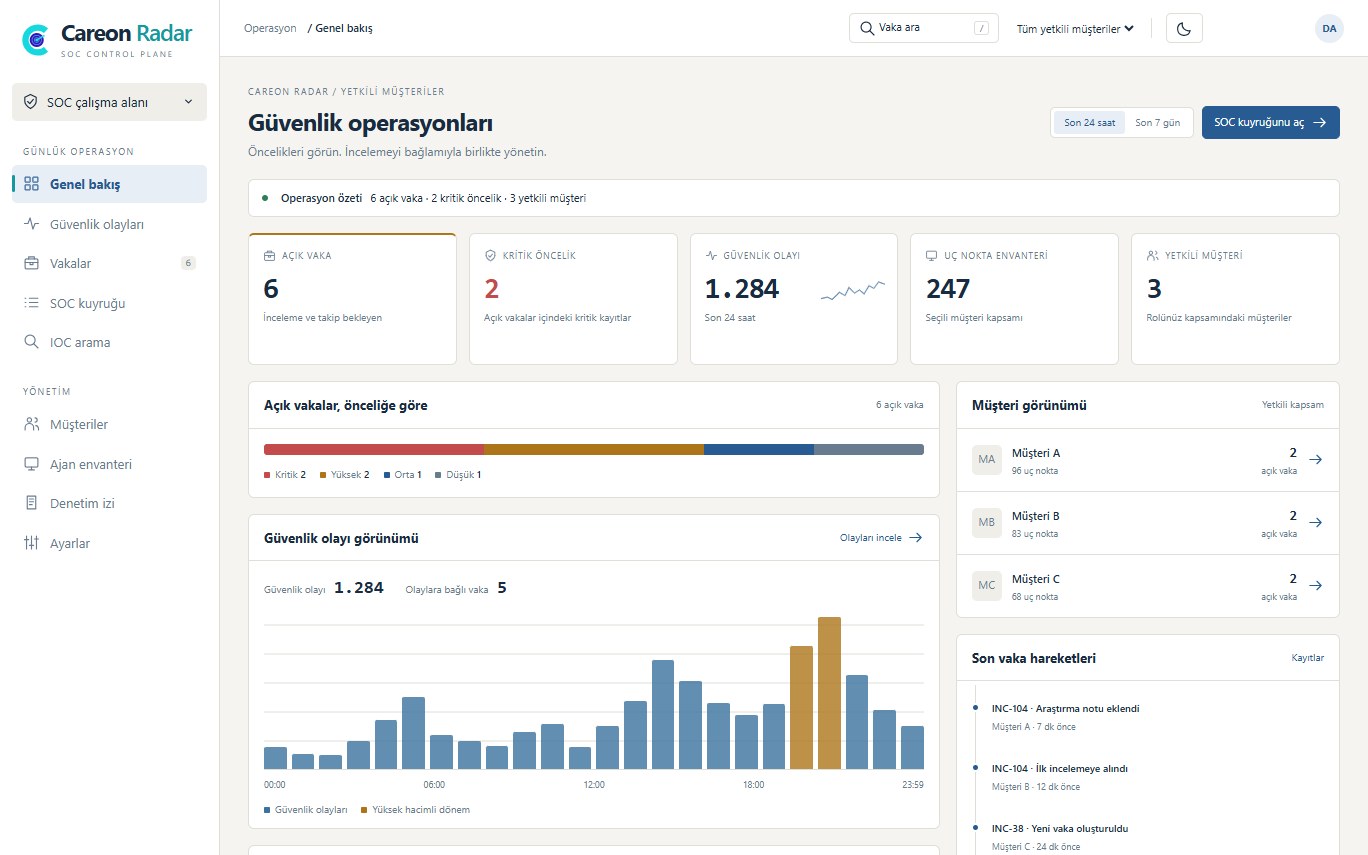
Radar SOC overview screen: open cases, critical priorities, security event chart, customer view and recent case activity Critical cases firstopen cases sorted by priority Access boundaryeach analyst sees only the customers they are authorized for Event volumebusy periods stand out on the chart At a glanceopen cases · critical priority · authorized customers
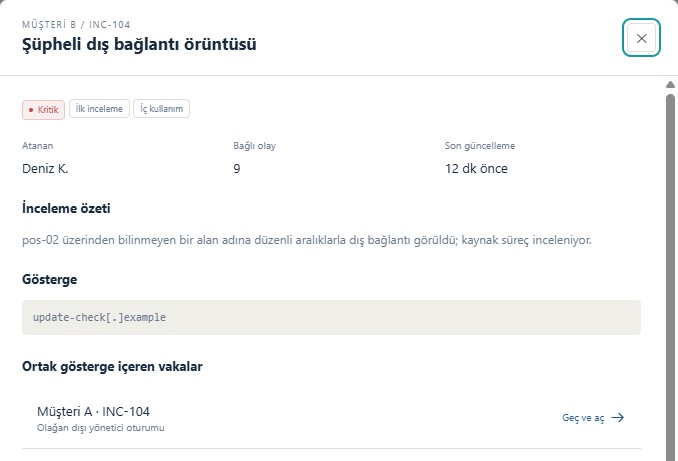
Case details: priority, status, related events, indicator of compromise and another customer's case containing the same indicator
Case and shared indicatorRelated events, the indicator of compromise and other cases where the same indicator was seen, on one card; customer data stays isolated.
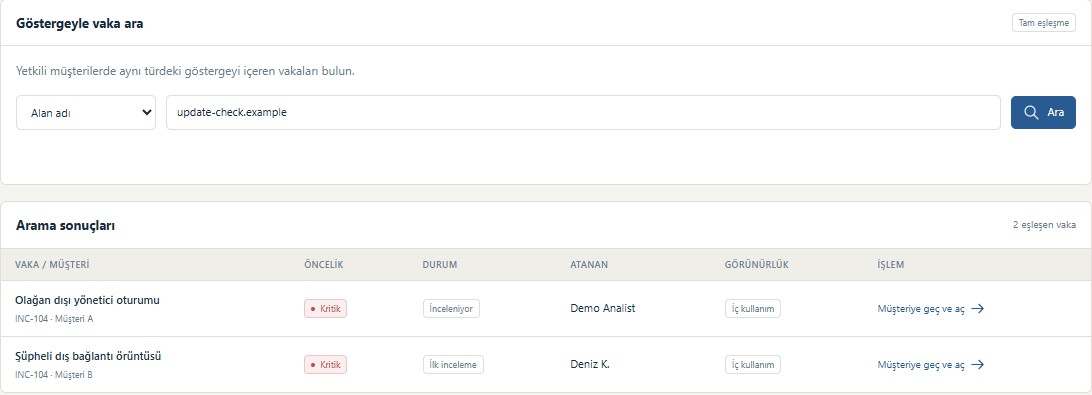
IOC search screen: two customer cases matching a domain indicator
IOC searchTrace an indicator across the cases of the customers you're authorized for.
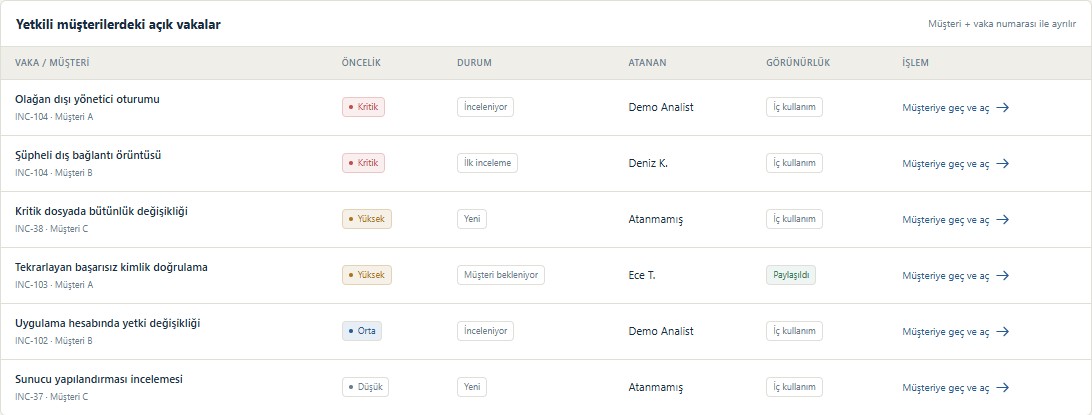
SOC queue: open cases of authorized customers and opening a case by switching to the customer view
SOC queueTrack open cases for all your authorized customers in one view; jump to a customer's case screen in one click.

Screenshots taken from a preview of the Radar SOC interface, shown with sample data; no real customer information.

Scope

Service scope and first-response targets

  • Alert monitoring7/24
  • Validation, classification and escalation
  • Incident response according to the authorization matrix
  • In-depth incident analysis
  • Rule tuning
  • Vulnerability management
  • Threat hunting
  • Threat intelligence (CTI)
  • Security hardening consultingQuarterly
  • Awareness training and simulation
  • Periodic reportingEvery two weeks
  • Annual assessment report
  • Customer Success Manager
  • Technical Account Manager

First-response target for security incidents

First-response targets for security incidents
PriorityFirst response
Critical30 min
High1 h
Normal4 h
Low8 h

The analyst sets the incident severity

  • S1Active attacker activity, data exfiltration, privilege escalationCritical
  • S2Software or documents assessed as malicious with high confidenceHigh
  • S3Findings assessed as malicious with low confidence, reconnaissance commandsNormal
  • S4Informational alertsLow
Service onboarding

The security service goes live in seven steps.

  1. Kick-off meeting
  2. Confirming the inventory of users, endpoints, tenants, workloads and log sources
  3. Reviewing existing configuration and policies
  4. Responsibility matrix, communication plan and escalation matrix
  5. Configuring tenant permissions
  6. Agreeing on the response authorization matrix
  7. Defining report content and reporting frequency
  • Incidents are managed as cases in our Security Operations Center, where related alerts and findings are merged into a single case.
  • Security incidents and the actions taken are reported in real time on the ticket in the service portal.
  • Critical-priority incidents are also reported 24/7 by phone to the contacts in the communication plan.
  • The periodic report covers incident statistics, a summary of actions taken, recommendations on critical incidents, vulnerability findings and Secure Score work.
  • Services are limited to the capabilities of your Microsoft licenses; access uses supported methods such as Azure Lighthouse and GDAP.
Glossary

Terms used in this service

Managed extended detection and response (MXDR)

A service provider managing threat detection, assessment and response processes using XDR solutions.

Managed security operations center (MSOC)

A service provider running an organization's security monitoring and incident management processes.

Threat hunting

Searching for signs of threats that have not yet triggered alerts, using threat intelligence-driven scenarios and proactive queries.

Threat intelligence (CTI)

Assessing information on current attack techniques, threat actors and indicators of compromise in the context of the environment in scope.

Vulnerability management

Monitoring vulnerabilities in assets through Microsoft security platforms, prioritizing them by risk, and planning remediation steps with the customer.

Security hardening

Reviewing the environment against CIS benchmarks and Microsoft Secure Score recommendations, identifying applicable measures, and putting them in place under a plan prepared with the customer.

Rule tuning

Reviewing the rules and policies that generate alerts to reduce false positives and false negatives, and defining exceptions where needed.

Response authorization matrix

A document agreed at service onboarding that defines the actions CareOn may take on your behalf, such as isolation, quarantine, blocking and session termination, along with their conditions and approvers.

Other services

How are other services delivered?

CareOn Ops

Inventory-based

Delivered per unit such as server, user, device, tenant, subscription, log source, workload or TB; standard first-response targets are Critical 30 minutes, High 1 hour, Normal 4 hours, Low 8 hours.

CareOn Ops →
CareOn Radar

Standalone component

Monitoring, alarm management, notification and reporting for system, cloud, network and security components can be purchased separately from the operations service.

CareOn Radar →
CareOn Expert

Work package

Design, implementation, migration and system health assessments are priced as a project or consulting work package.

CareOn Expert →
CareOn Cloud · Protect

IaaS · BaaS · DRaaS

Cloud infrastructure in İstanbul and Ankara, immutable backup, and a disaster recovery site on a monthly subscription.

CareOn Cloud →

Let's plan your security operations together.

Urgent incident

If an incident is taking your services down or putting your security at risk, don't wait. You can report critical incidents on this line 24/7.

+90 850 399 37 24

Assessment call

Tell us about your current setup and priorities, and we'll work out together where it makes sense to start.

Schedule a call

Quote request

We'll prepare a quote based on your number of endpoints, users and log sources.

Request a quote